SIGVERN RF Installation Guide
Legacy guide: this page covers ESP8266 v1.2.0, originally released as OpenRF Platform. Current SIGVERN RF releases target ESP32-S3; see the current ESP32-S3 guide for beta.3.
Welcome to SIGVERN RF. Choose the installation method that best matches your needs.
🧑💻 Source Code
Best for: Developers and contributors.
Download: SIGVERN RF-Platform-v1.2.0.zip
- Modify the source code
- Compile with PlatformIO
- Build your own firmware
⚡ Precompiled Firmware
Best for: Most users.
Downloads: firmware.bin + littlefs.bin
- No compiling required
- Ready to flash
- Quick installation
CC1101 Wiring
Connect the CC1101 module to the ESP8266 NodeMCU V2 exactly as shown below.
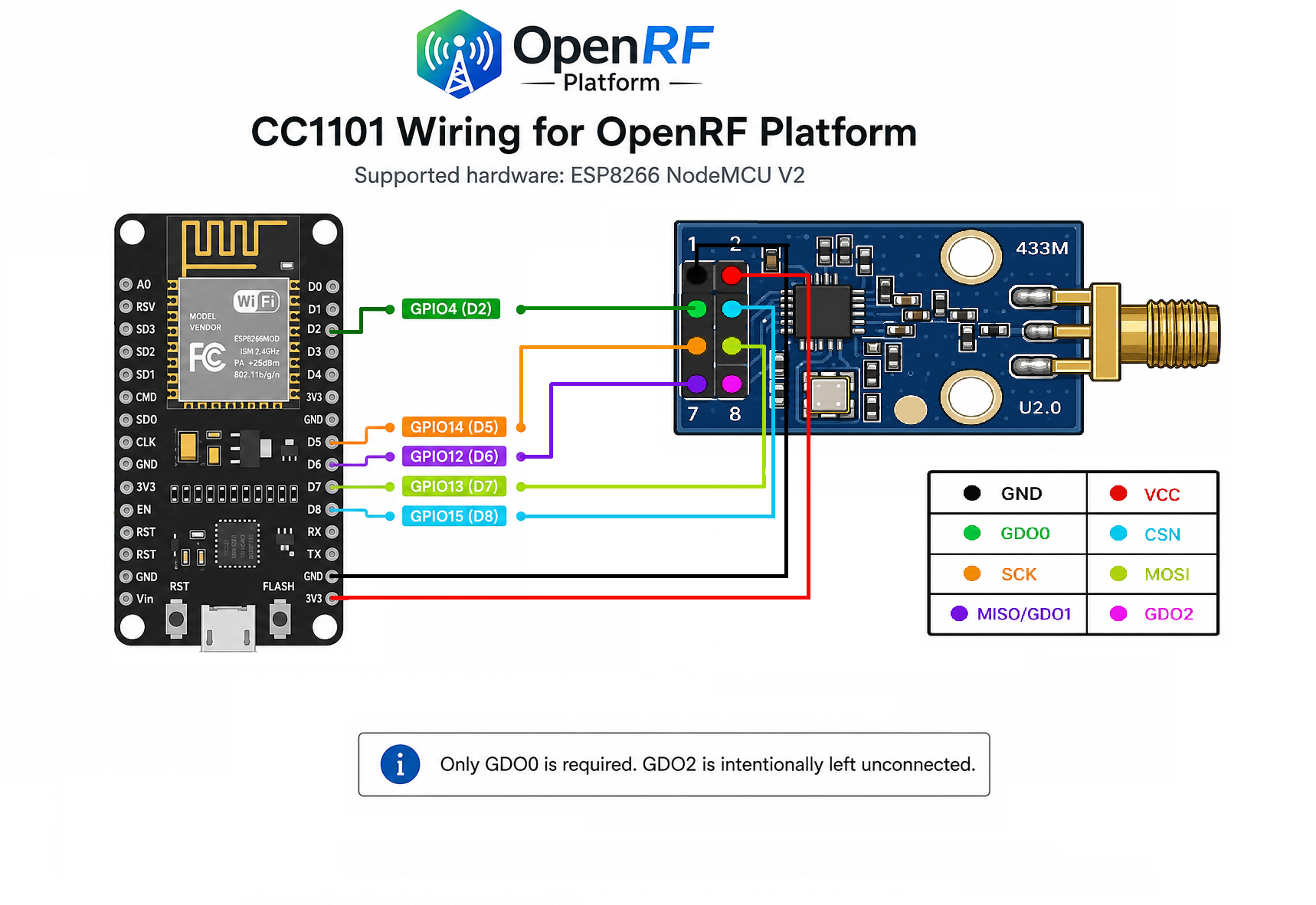
Note:
Only GDO0 is required.
GDO2 is intentionally left unconnected.
Installing from Source Code
- Download and extract the source package.
- Open the project in Visual Studio Code with PlatformIO.
- Build the project.
- Upload the firmware.
- Build and upload the LittleFS filesystem.
- Restart the ESP8266.
Installing Precompiled Firmware
What is firmware.bin?
firmware.bin is the operating software of SIGVERN RF.
It contains RF communication, Wi-Fi, MQTT, Home Assistant integration,
OTA support and all platform features.
Without this file the device cannot start.
What is littlefs.bin?
littlefs.bin is the internal filesystem that stores the built-in web interface.
It contains:
- Configuration pages
- HTML
- CSS
- JavaScript
- Images and icons
Think of firmware.bin as the operating system of SIGVERN RF and
littlefs.bin as the website stored inside the device.
Without littlefs.bin, the ESP8266 will still operate normally,
including RF communication, MQTT and Home Assistant integration,
but the configuration website will not be available.
First Installation
Manual Flashing (esptool)
If you are flashing the firmware manually instead of using PlatformIO,
use the following flash offsets:
| File |
Flash Offset |
| firmware.bin |
0x000000 |
| littlefs.bin |
0x300000 |
Using an incorrect LittleFS flash offset may cause the device to boot normally while the web interface is unavailable (for example:
/index.html not found).
- Flash firmware.bin.
- Flash littlefs.bin.
- Restart the ESP8266.
- If no Wi-Fi credentials are configured, the device starts in Access Point (AP) mode.
- Connect to the SIGVERN RF Wi-Fi network.
- Open the web interface and complete the initial configuration.
Updating
First installation?
Flash firmware.bin +
littlefs.bin.
Already using SIGVERN RF?
If the release notes mention WebUI, HTML, CSS, JavaScript or LittleFS changes,
flash both files.
Otherwise, flash firmware.bin only.
Version Compatibility
| Correct |
Incorrect |
firmware.bin v1.2.0
littlefs.bin v1.2.0
|
firmware.bin v1.2.0
littlefs.bin v1.1.0
|
Quick Start
-
I just want to use SIGVERN RF
→ Download firmware.bin and
littlefs.bin.
-
I want to develop SIGVERN RF
→ Download SIGVERN RF-Platform-v1.2.0.zip.